
Keeping Subscriber Data in Sync, Instantly
The problem
A single subscription platform serving several independent publisher sites means every subscription change needs to land in the right place: the right email list, the right audience segment, sometimes a fulfillment team, always a record for later. Checking for updates once a day isn’t enough. A new subscriber who signs up in the morning shouldn’t have to wait until tomorrow’s batch job to show up anywhere, and treating every publisher’s subscribers the same regardless of which site or plan they belong to loses information that matters downstream.
The framing
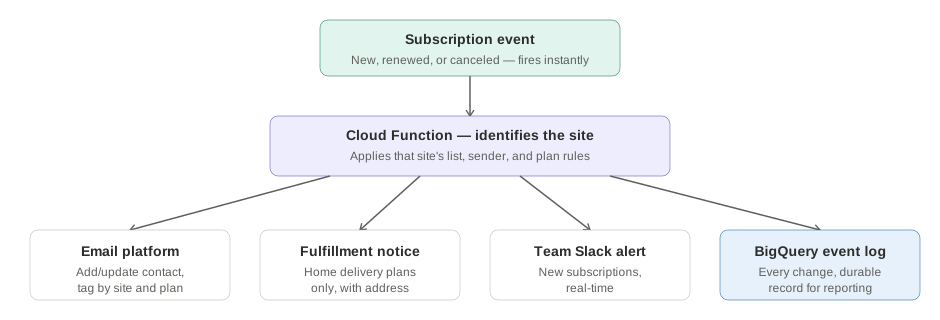
The system listens for subscription changes (new, renewed, canceled) the moment they happen and routes each one based on which publisher site it belongs to. From there:
- The subscriber is added or updated in the correct publisher’s email list, tagged by publication and plan so segmentation stays accurate without anyone managing it by hand
- Subscriptions tied to home delivery trigger a separate notification to the fulfillment team with the delivery details needed to act on it
- New subscriptions trigger a real-time notification to the team
- Every change is logged for later, so the data is available for reporting, not just acted on and discarded
- Errors are caught and flagged immediately, rather than surfacing as a mystery gap in the data days later
Tools
Google Cloud Functions (HTTP-triggered), Cloud Secret Manager for credentials, BigQuery for event logging, the publisher’s email platform API for subscriber and segmentation management, Slack for real-time and error notifications.
Result
Subscription changes across multiple publisher sites are handled correctly and immediately, with no manual reconciliation step and nothing lost to a batch window. The event log turns every change into a durable, queryable record, which is what makes it possible to build reporting or troubleshoot a data discrepancy after the fact.
What this demonstrates
Multi-tenant systems design: recognizing that “route this event” isn’t one decision but several (which account, which segment, does this need a fulfillment alert, does this need to be logged for later), and building a single pipeline that makes all of those distinctions correctly and automatically.